Your private safety circle

Get home
safe. Stay free.

For the last train, the walk home, and everything in between. A little peace of mind, with your people by your side.

No permanent trackingYour circle needs no app

A new chapter. Pretorian is now HomeSafe.

A little peace of mind.
In your pocket.

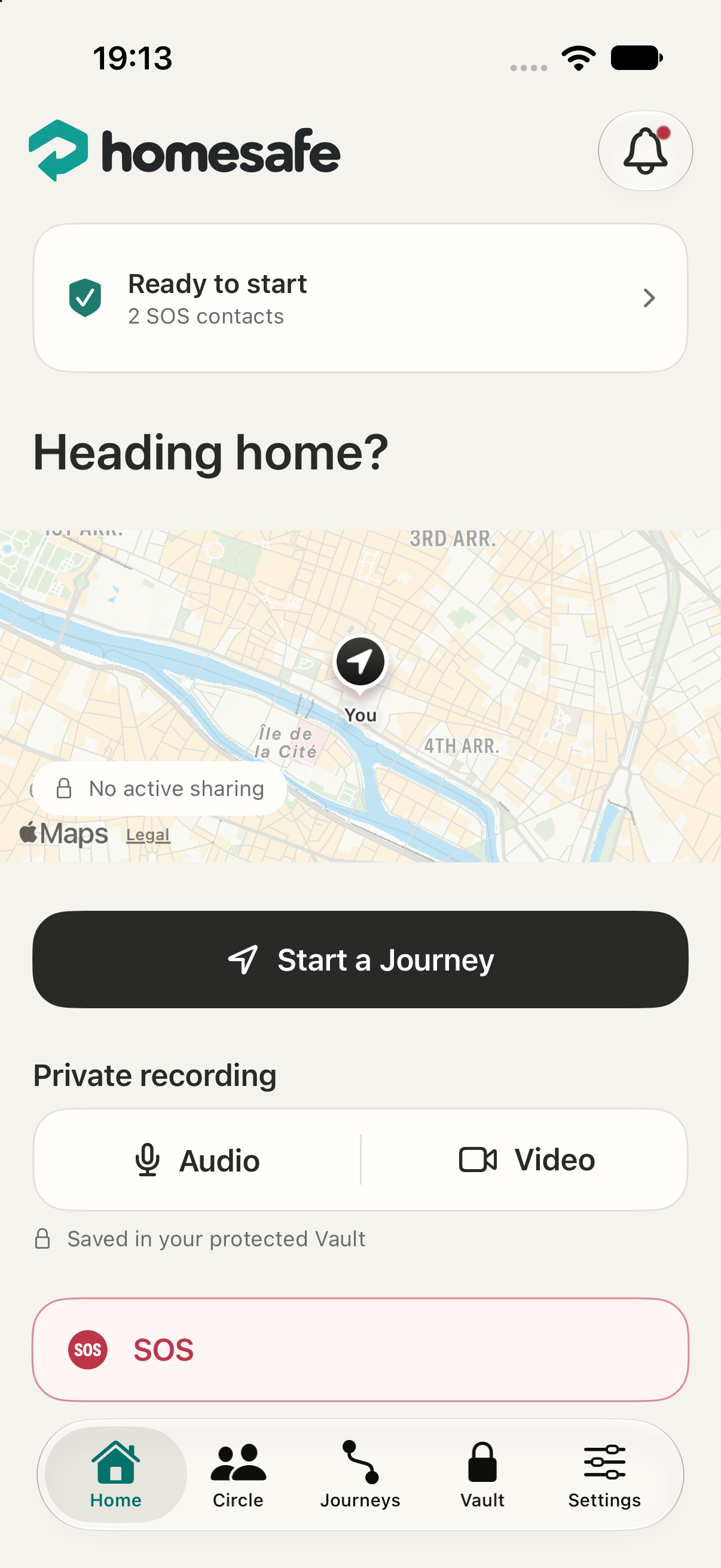
HomeSafe in light mode on iPhone: a journey map, private audio and video recording, and an SOS button.
Home safe.Sharing ends here.

The HomeSafe app · Demo preview

A little closer.
A little more at ease.

Your trusted peopleAlways on your termsJust for the journey

A little support goes a long way

Live your life.
Keep your people close.

Three ways to feel supported.
One app, there when it matters.

01 / Shared journeys

On your way.
Not on your own.

Choose a destination and your trusted people. They can follow your progress until you end your journey.

Heading homeOn my way home

Share a moment, not your whole day.

02 / Private recordings

A record.
Just for you.

Record audio or video without alerting your circle. Encrypted segments are uploaded as you record and kept in your private Vault.

Your recordings. Your choice to share.

03 / An SOS to your circle

When you need
your people.

Press and hold to send an SOS. Your chosen contacts get an alert, your temporary location and the evidence you allow them to access.

Reach the people
you trust.

Support from your circle, within reach.

Beyond your phone

Recorded in moments.
Protected as you go.

When you’re connected, HomeSafe encrypts and uploads your video in small segments, without waiting for the recording to finish.

If your phone is damaged, taken or destroyed, the segments already received remain saved in your Vault.

A little at a time. Already saved.

  1. You recordCapture audio or video on your iPhone.
  2. Encrypted in small segmentsProtected on your phone before upload.
  3. Saved along the wayReceived segments stay in your private Vault.

Only successfully received segments are backed up. An offline phone cannot send new footage.

Private HomeSafe link

Example shared journey

Camille is on
the way home.

One link to be there.
Just for this journey.

This journey is shared with you

Close, even from a distance.

The people in your corner

Your circle.
One simple link.

Being there shouldn’t be complicated. Your people can open your active journey or authorised SOS evidence in their browser, with the permissions you choose.

  • No app for your people to install
  • Only the information you choose to share
  • Time-limited access you can revoke
Bring your people a little closer

Care, with room to breathe

Feel protected.
Without feeling watched.

Peace of mind should leave you feeling free.

01

You start it.

Protection starts with your choice. Your circle doesn’t get a permanent window into your everyday movements.

02

You choose who sees.

Decide which contacts can see your location or access your recordings when you send an SOS.

03

Sharing has an end.

When you end your journey, temporary access closes. The rest of your day stays yours.

Recordings are encrypted on your iPhone before upload.

Let’s be clear

A few things
you might wonder.

Trust starts with knowing how it works.

Ask us anything
Does HomeSafe track me all day?

No. Your location is shared with your people only during a journey or alert you start. When you end the journey, temporary sharing stops.

Do my contacts need to install HomeSafe?

They can accept a circle invitation in their browser and receive SOS alerts by email. A private link lets them see the active journey or authorised evidence without installing the app.

What if my phone is taken or destroyed?

HomeSafe sends encrypted video segments while you record, rather than waiting for one complete file. Segments already received remain saved even if your phone is taken, destroyed or switched off. Anything that has not yet uploaded is not backed up, and an offline or damaged phone cannot send new footage.

What happens if I have no signal?

Encrypted fragments wait on your phone and upload when the connection returns. Alerts and live sharing need a connection: your people won’t receive new updates while your phone is offline.

Does an SOS call the emergency services?

No. A HomeSafe SOS alerts your trusted contacts. It does not replace a call to emergency services. If you’re in immediate danger, call your local emergency number.

How can I try HomeSafe?

HomeSafe is in private beta on iPhone. Email contact@pretorian.io to request access. We’ll let you know how to take part.

For you. And the people who care.

“Text me when
you get home.”

We all know the feeling.
HomeSafe is here for what comes next.

Request early access Private beta · For iPhone